Rent Roll
Shows a Square Foot or Unit based Rent Roll for the property being analyzed. The 'Monthly' checkbox allows you to show $/Month rather than $/Year, $/Month/RSF, etc. If your property leases include reimbursements, there will be a 'Include Reimbs' checkbox so the $ numbers can include those reimbursements or not. Pie Charts are available here by adding the Graphics Extension.
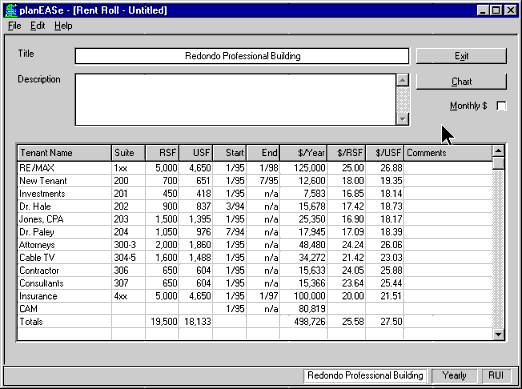
This function produces Rent Roll reports and graphs for either commercial multi-tenant
properties (like Office Building or Retail Centers), or Unit oriented properties
(like Apartments or Mini-Storage). The Rent Roll Report is automatically produced
from the values in your Assumption Set. If you have used the Revenue Calculator
in Unit mode or entered the Square Feet or Units field as less than the crossover
value, the Unit Rent Roll will be displayed (as shown below). Otherwise, the Commercial
Rent Roll is displayed (as shown above).

You may edit the Rent Roll, adding and deleting rows, changing (or adding) SqFt
measures, or other entries, and the totals automatically are adjusted as you go.
Once you have edited the Rent Roll to your specifications, you may save it to disk
for later recall, using
File/Save RentRoll As. You may sort the Rent Roll
on any column by left / right clicking the column heading for ascending / descending
order.
The Rent Roll can be used as a stand alone report generator with full file open/save
and editing capability. although the default behavior is to present you with the
Rent Roll imported from your Assumption Set, you can choose
File/New RentRoll
to enter values of your own choosing on a "blank" rent roll.
Monthly
checkbox changes all dollar numbers to a monthly basis.
If you have purchased the optional Graphics Extension, a
Chart button will
be available, offering Pie Charts of the information contained in the report. Pie
Charts are available showing
- Rentable Square Feet
- Usable Square Feet
- Unit Distribution
- Unit Square Footage Distribution

Above the Pie Charts are the Graph Controls. These controls allow you to customize
the chart's appearance to your specifications. You may want to experiment with each
of the controls to see how they affect the displayed (and printed) chart, as described
below. In addition, you may print, edit and export Pie Charts.
- 3D adds an attractive three dimensional effect to the graph.
- color specifies the first (bottom) color shown.
- Font controls the typeface used to display the graph labels and
numbers.
- Data allows you to choose between various available Pie Charts.
- Explode Segment explodes any segment to emphasize it for presentation.
- $ Labels adds $ values to the segment labels.
- % Labels adds percentage values to the segment labels.
- Label Lines adds lines leading to the segment labels.
Shows a Square Foot or Unit based Rent Roll for the property being analyzed. The 'Monthly' checkbox allows you to show $/Month rather than $/Year, $/Month/RSF, etc. If your property leases include reimbursements, there will be a 'Include Reimbs' checkbox so the $ numbers can include those reimbursements or not. Pie Charts are available here by adding the Graphics Extension.
